Overview
PastPaths is built around six fundamental building blocks. Once you understand how they fit together, the rest of the manual becomes much easier. This page gives you the bird's-eye view.

The building blocks
Persons
People are the heart of a family history. A person can have a name, gender, birthplace and place of death, notes, and relationships to other people.
Birth and death are also saved as events. What you fill in on the person shows among the person's events, and a birth or death event you add on the person's Events tab shows on the person — in the person list, the family tree, and the search.
Places
A place can be a city, a farm, a house, a church, or a country. Places are linked to persons (where they were born, died, or lived) and to events (where something happened).
By linking places to people instead of typing the location as free text, it becomes easy to later see "who in my family has lived in Hagfors?" or "which events took place at Mariakyrkan?".
Events
An event is something that happened at a particular time in a particular place — a birth, a baptism, a marriage, an emigration. Events have a date, a place, participants (persons), and can have media and sources linked to them.
Media
Media means photos, documents, audio recordings, and more. The same image can be linked to multiple persons, events, and places — you never need to upload the same photo more than once.
Sources
Good genealogical research requires documenting where information comes from — sources. A source might be a parish register, a census, a letter, or an estate inventory. When you say "Erik was born in 1872," you should be able to point to where that information comes from.
Relationships
Relationships describe how people are connected: parenthood, marriage, siblings. PastPaths automatically works out indirect relationships (cousin, grandmother, brother-in-law) based on the direct relationships you've entered.
Read more about relationships →
How does it all fit together?
Picture a photo of your grandfather. In PastPaths, that photo can be linked to:
- The person grandfather
- The event "Confirmation 1923"
- The place "Härnösand Church"
- The source "Family album from Märta"
It's all the same file — no copies needed. And later, when you search for "all photos from Härnösand" or "all photos with grandfather," that same photo shows up in both lists.
That's the difference between collecting photos alongside your genealogical research and letting the photos become part of it.
Other features
Beyond the building blocks above, PastPaths has a few supporting features:
- Search — the search box at the top searches persons, places, events, sources, and blog posts at once. Choose a tab in the box to see more results of one type, or Show all to open the list. You can also search by event type, for example "death" or "baptism".
- Research — research notes, bookmarks, what you last worked on, the calendar, statistics, and reports, and Research branch for going through a person's relationships
- Reports — print family charts and lists
- Timeline — visualize events chronologically
- Blog — write longer family stories
- Tags and categories — organize and find things quickly
Where is my data stored?
Everything — your database, all images, all documents — is stored locally on your computer, in a folder that PastPaths creates the first time you start it.
C:\Users\YOUR_NAME\AppData\Local\PastPaths
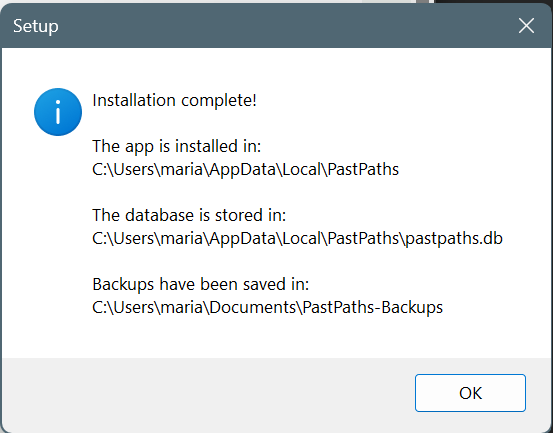
This means two important things:
- Your data is private — it never leaves your computer unless you move it yourself.
- Backups are your responsibility — if your hard drive fails, the data is gone. Read more under Backups.